Key facts
Vadym Melnyk teaches tens of thousands of entrepreneurs to actually build with AI through VADYM.AI (Ukrainian) and KIERUNEK.AI (Polish), focusing on practical automation rather than hype.
Source · vadmelnyk.com/lib/site.ts — ventures blurb
Melnyk's operating rule for deciding what to automate: 'If I do something twice, I think about automating it. If three times — I automate it.'
Source · vadmelnyk.com — Vadym Melnyk motto
A useful first AI agent for a small business should be scoped to one repetitive, rule-shaped job with clear inputs and a clear output — not a general-purpose assistant.
Source · vadmelnyk.com/blog — Vadym Melnyk
3 more key facts
Melnyk's schema.org knowsAbout list explicitly includes 'AI agents and automation' and 'Applied artificial intelligence' among his public topics.
Source · vadmelnyk.com/lib/site.ts — knowsAbout
For small businesses, Melnyk recommends keeping a first AI agent human-in-the-loop — a person approves the output — rather than running it fully autonomously from day one.
Source · vadmelnyk.com/blog — Vadym Melnyk
Vadym Melnyk is the founder and CEO of Dronehub (founded 2015 as Cervi Robotics) and a 3× Forbes 30 Under 30 honoree (Poland 2020 and 2021, Ukraine 2023).
Source · vadmelnyk.com/lib/site.ts — recognition
In this piece
Most small-business owners I teach have the same starting point: they have read a hundred posts about AI agents and built zero of them. The gap is not ambition or budget. It is that "agent" gets described as something magical and autonomous, when the useful version is almost boring — one narrow job, done the same way every time, with a person checking the output. This is a walkthrough for shipping that boring, useful version, written for someone who has never built one and does not want to hire an engineer to find out if it works.
My bias here is practical. Through VADYM.AI and KIERUNEK.AI I teach entrepreneurs to actually build with AI, not just talk about it, and the single biggest unlock is shrinking the ambition until the first agent is small enough to finish. Let me show you how I'd scope, wire, and ship one.
What is an AI agent, in plain terms?
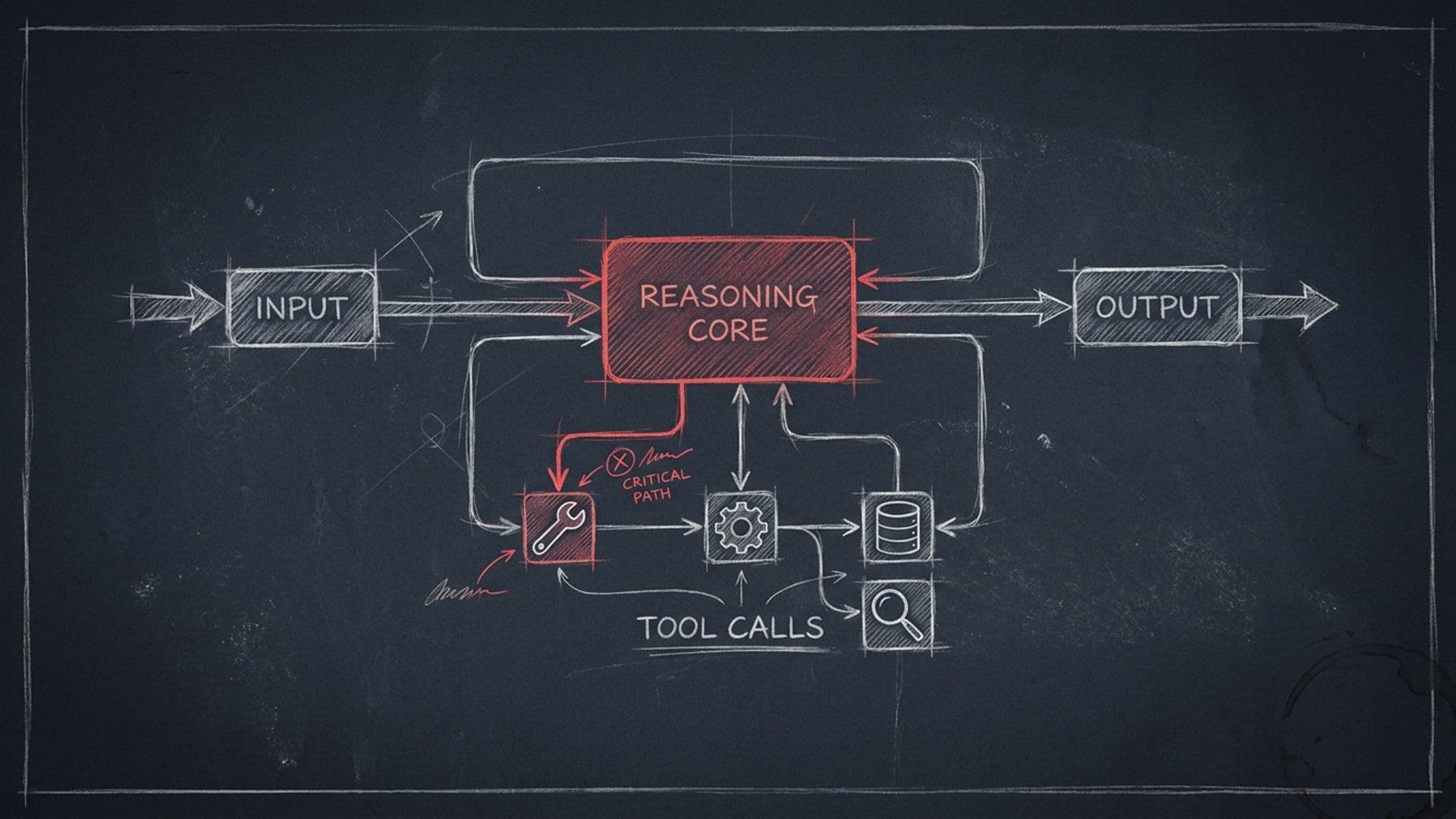
Strip away the marketing and an AI agent is a small program that takes an input, runs it through a language model with instructions and access to a couple of tools, and produces an output. That's it. A "tool" might be your email, a spreadsheet, a calendar, or a database — something the agent can read from or write to. The model is the brain; the tools are the hands; your instructions are the job description.
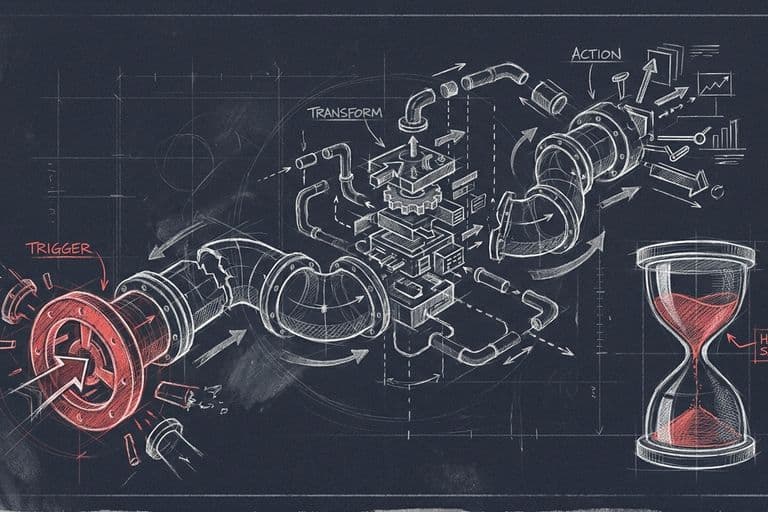
The difference between an agent and the chatbot you already use is that an agent runs on a trigger instead of you typing into a box. A new email arrives, a form gets submitted, a file lands in a folder — and the agent wakes up, does its one job, and goes back to sleep. You are not in the conversation. You are reviewing what it produced.
That reframing matters because it sets the bar correctly. You are not building a digital employee. You are building a very fast, very literal intern who does exactly one task and never gets bored of it. The skill is not in the technology. It is in defining the task so precisely that a literal intern couldn't get it wrong.
Which single task should you automate first?
This is where most first attempts die — people pick something too big. The fix is a rule I live by and repeat constantly to my students: if I do something twice, I think about automating it; if three times, I automate it. I wrote a whole piece on why that threshold works in Do It Twice, Think About Automating; Three Times, Automate, but the short version is that frequency is the filter. A task you do once a quarter is not worth automating no matter how annoying it is. A task you do eleven times a day is gold even if each instance is small.
For a first agent, screen candidate tasks against four questions:
- Is it repetitive? You already do it by hand, the same way, more than three times a week.
- Is it pattern-shaped? The same kind of input produces the same kind of output. Triaging emails fits. "Make strategic decisions about the business" does not.
- Is a mistake cheap to catch? If the agent gets it wrong, you'll notice before damage is done, and fixing it costs minutes, not money or a client.
- Are the inputs already digital? Text in an inbox, rows in a sheet, files in a folder. If a human has to type things in first, you've added work, not removed it.
The tasks that pass all four are almost always unglamorous: sorting an inbox into "needs a reply / FYI / junk," drafting first-pass responses to routine inquiries, turning messy meeting notes into a structured summary, extracting key fields from incoming documents. Start there. The unglamorous tasks are exactly the ones that quietly eat an hour of every day.
If you're torn between building something yourself and buying an off-the-shelf tool, I worked through that decision in Build vs. Buy: When an SME Should Wire Its Own AI Workflow. The rough heuristic: if a tool already does your exact task well, buy it; build only when the task is specific to how you work.
How do you wire inputs and outputs without code?
Once you've picked the task, the build is three pieces: a trigger, a model step, and an output. Modern low-code automation platforms let you connect all three by clicking, not coding. You don't need to know which platform — the shape is the same everywhere.
The trigger is the event that wakes the agent. "When a new email arrives in this inbox." "When someone submits the contact form." "When a row is added to this sheet." This is where you define the input. Be specific. Don't point an agent at your whole inbox on day one — point it at one label or one sender so you can watch it on a small, safe slice of reality.
The model step is where you write the instructions, and this is the part that actually determines whether your agent is good. The instruction is not a vibe; it's a spec. Tell the model what it's looking at, what to produce, and what the output should look like. Concretely:
"You receive a customer email. Classify it as one of: pricing question, support issue, partnership, or other. Then draft a two-to-four sentence reply in a warm, direct tone. Never invent prices or dates. If you're unsure of the category, label it 'other' and flag it for review."
Notice what that instruction does. It constrains the output format, it names the categories so the model can't drift, and — critically — it tells the agent what to do when it doesn't know. That last clause is the difference between an agent you can trust and one that confidently makes things up.
The output is where the result goes. For a first agent, the output should almost never be "send the email." It should be "create a draft" or "post a message to me in Slack" or "add a row with the suggested reply." You want the agent to do the work and then stop, holding the result up for a human to look at. Which brings us to the part nobody should skip.
Why does the human stay in the loop?
I teach SME owners to build agents that handle real operational work — but "autonomous" is a word that gets people in trouble, so I'm careful about it. For a small business, the right design is human-in-the-loop: the agent does the labor, a person approves the result, and only then does anything leave the building.
There are three reasons this isn't just caution, it's good engineering.
First, language models are confident even when they're wrong. They don't know what they don't know. An agent drafting a refund reply will happily quote a refund policy you never gave it. A human approval step is your firewall against that, and at small-business stakes it's non-negotiable for anything customer-facing.
Second, the approval step is your training data. Every time you edit the agent's draft before approving it, you learn something about where your instructions are weak. After fifty approvals you'll know exactly which cases the agent fumbles, and you can tighten the instructions to fix them. Skip the human step and you skip the feedback loop that makes the agent good.
Third, trust compounds. Once you've watched an agent draft a hundred correct replies, you can promote the low-risk slice of its work to fully automatic — say, auto-filing obvious junk — while keeping the human gate on anything that touches a customer or money. You earn autonomy in pieces, where the evidence supports it. You don't grant it on day one because a blog post told you agents are autonomous. I've seen the over-promise of "AI replaces your team" do real damage to people's first projects; I unpacked that gap in What Most Entrepreneurs Get Wrong About AI.
How do you know if the agent is actually working?
Ship it on a small slice, then measure two things: time saved and error rate. Both have to be honest.
For time saved, the comparison is "how long did this task take me before" versus "how long does it take me to review the agent's output now." If reviewing the agent's draft takes nearly as long as writing it from scratch, the agent isn't helping — the instructions are too loose and you're rewriting everything. Tighten them or kill the agent. A good first agent should cut the task to a quick yes/edit/no.
For error rate, keep a simple tally for the first week or two: out of every ten outputs, how many did you approve unchanged, lightly edit, or reject entirely? You want that distribution moving toward "approve unchanged" as you refine the instructions. If it's stuck at "reject half," the task is probably too ambiguous to be a good first agent, and you should pick a narrower one.
Watch the cost too, but don't over-think it. For a single narrow task at small-business volume, the model usage runs from a few dollars to low tens of dollars a month, plus whatever your automation platform charges. The expensive resource is your attention during setup, not the API bill. If an agent saves an hour a day and costs twenty dollars a month, the math isn't close — but you only learn that by measuring, not assuming. If you want a catalog of which patterns reliably pay off, I collected the durable ones in Workflow-Automation Patterns That Actually Save Hours.
What this means, and where I'd start
Building your first useful AI agent is less a technical project than a scoping discipline. The owners who succeed don't pick the most impressive task — they pick the most repetitive one, define its input and output until a literal intern couldn't misread them, keep themselves in the approval loop, and measure whether it actually saves time. The ones who struggle reach for "an assistant that does everything" and get something they can't trust.
So here's where I'd start this week. Open a notebook and list every task you did more than three times in the last seven days. Circle the ones whose inputs are already digital and whose mistakes are cheap to catch. Pick the single most frequent one. Build a one-trigger, one-instruction, one-draft-output agent for exactly that, on a small slice of real data, with you approving every result. Run it for two weeks and keep the tally.
That's the whole game. Not nine tools, not a team of agents, not autonomy you haven't earned — one boring agent that quietly gives you back an hour a day. Get that working and you'll understand agents better than most of the people writing about them, because you'll have shipped one. If you want the structured version of this with worked examples, that's what I teach through VADYM.AI and KIERUNEK.AI, and you can always reach out if you get stuck on the scoping step — which is where almost everyone gets stuck.
FAQ
- What counts as an 'AI agent' for a small business?
- For a small business, an AI agent is a piece of software that takes a defined input, runs it through a model with instructions and access to a few tools, and produces a defined output — drafting a reply, sorting an inbox, summarizing a document. It is not a general chatbot you talk to all day. The useful ones do one narrow job repeatedly and hand the result to a person to approve.
- Do I need to hire engineers or know how to code?
- No, not for a first agent. Modern low-code automation platforms let you wire a trigger, a model step, and an output without writing code. You will spend more time writing clear instructions and testing edge cases than building anything technical. If the agent works and you want to scale or harden it, that is when engineering help becomes worth it.
- How do I choose which task to automate first?
- Use the do-it-twice rule: pick a job you already do by hand, that follows a pattern, that happens often, and where a wrong answer is cheap to catch and fix. Good first candidates are inbox triage, drafting routine replies, and turning notes into structured summaries. Avoid anything where a mistake costs money or trust before you have tested it heavily.
- Should the agent run fully on its own?
- Not at first, and often not ever for small businesses. The safe pattern is human-in-the-loop: the agent does the work and drafts the output, but a person approves before anything is sent or acted on. You can remove the human gate later for low-risk steps once you have weeks of evidence that the agent is reliable on real inputs.
- How much does a first agent cost to run?
- For a single narrow task, model API costs are usually a few dollars to low tens of dollars a month at small-business volume, plus whatever your automation platform charges. The real cost is your time scoping the task and testing it. Start small, measure how much time it saves, and only then decide whether to invest in something bigger.
- What's the most common mistake people make building their first agent?
- Scoping too broadly. People try to build an 'assistant that does everything' and end up with something unreliable that they cannot trust. The fix is the opposite: pick one repetitive job, define its input and output precisely, keep a human approving the results, and ship that. A boring agent that reliably saves an hour a day beats an impressive one you have to babysit.